WerkIQ
WerkIQ Expense Claim

Effortless Employee Expense Reimbursements

Let employees submit expenses in seconds, route claims through approval workflows, and reimburse through payroll, all without email chains or lost receipts.
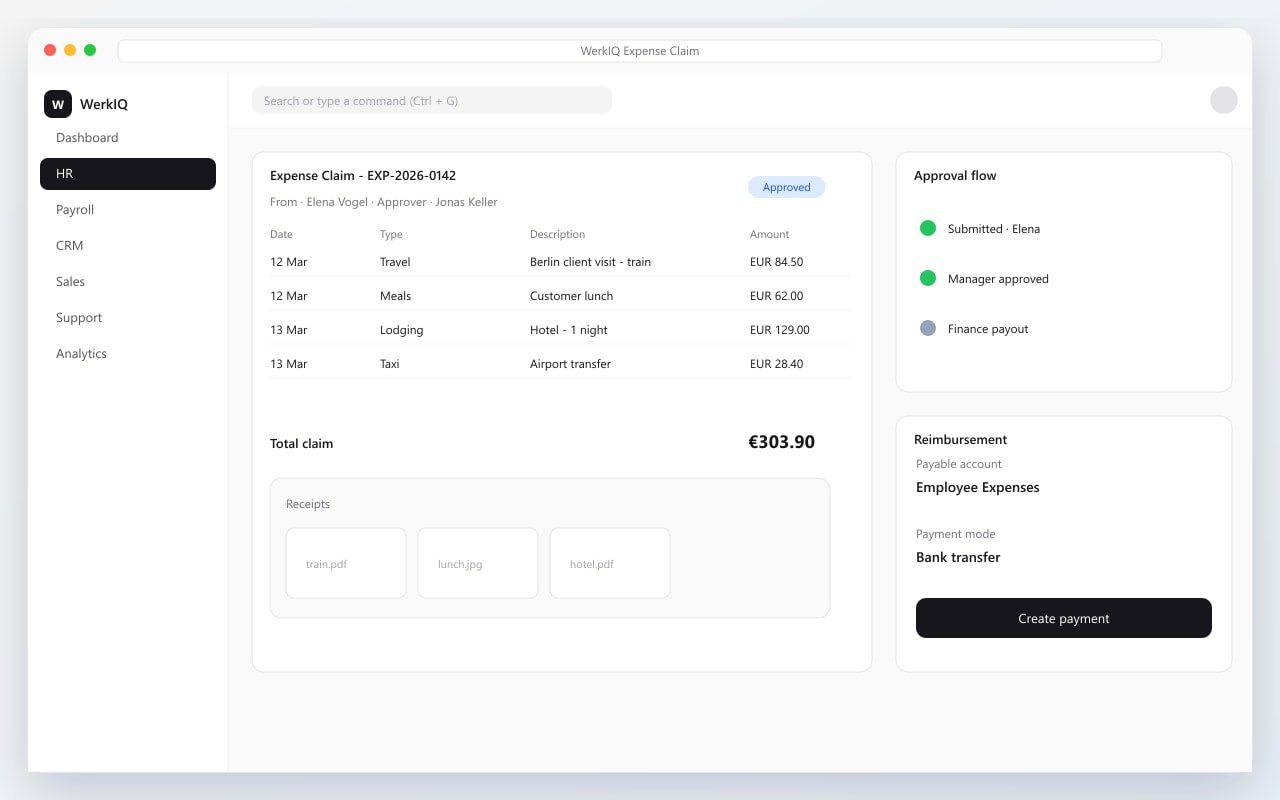
WerkIQ expense claim form with receipts and approval workflow
Reimbursements Made Simple

Expense claims shouldn't slow your team down.

WerkIQ Expense Claim gives employees a simple way to log expenses, attach receipts, and track approval status, while managers and finance teams get full visibility, policy controls, and automated reimbursement through payroll.

Everything You Need to Manage Expenses

Expense Submission

Make it easy for employees to log expenses.

  • Mobile-friendly submission
  • Multi-line expense claims
  • Expense date & description
  • Project or cost center tagging
  • Draft & submit workflow
  • Claim duplication
  • Submission history

Receipt Management

Keep proof of purchase attached to every claim.

  • Receipt photo uploads
  • PDF & image attachments
  • Multiple receipts per claim
  • Attachment preview
  • Required receipt policies
  • Secure file storage

Expense Categories

Organize spending with clear expense types.

  • Custom expense types
  • Category limits
  • Default accounts
  • Tax applicability
  • Billable vs non-billable
  • Department-specific categories

Approval Workflows

Route claims to the right approvers automatically.

  • Multi-level approvals
  • Manager approval rules
  • Finance review step
  • Approval delegation
  • Rejection with comments
  • Approval notifications
  • Escalation on delay

Mileage & Per Diem

Handle travel expenses with built-in rules.

  • Mileage rate configuration
  • Distance-based claims
  • Per diem allowances
  • Travel expense policies
  • Daily limit enforcement
  • Trip-based grouping

Policy Controls

Enforce company spending policies upfront.

  • Spending limits
  • Category restrictions
  • Mandatory fields
  • Policy violation alerts
  • Approver guidelines
  • Company expense policies

Reimbursements

Pay employees back quickly and accurately.

  • Payroll integration
  • Direct reimbursement entries
  • Partial reimbursements
  • Multi-currency support
  • Payment status tracking
  • Reimbursement history

Expense Reports

Analyze spending across teams and departments.

  • Claim status reports
  • Employee expense summary
  • Department spending
  • Category breakdown
  • Pending approval reports
  • Reimbursement reports
  • Export to Excel & PDF

Automate

Powerful Expense Automation

Speed up submissions, approvals, and reimbursements.

  • Expense approval routing
  • Manager reminder emails
  • Finance review notifications
  • Payroll reimbursement sync
  • Policy violation alerts
  • Pending claim reminders
  • Monthly expense summaries
  • Auto-reject incomplete claims
  • Escalation for overdue approvals

Reports Include

Reports & Analytics

Understand where your organization spends money.

  • Expense claim summary
  • Pending approvals
  • Approved vs rejected claims
  • Employee-wise expenses
  • Department spending trends
  • Category analysis
  • Mileage & travel reports
  • Reimbursement status
  • Monthly expense totals
  • Policy exception reports

Why Choose WerkIQ Expense Claim

Employee Friendly

Simple submission from desktop or mobile with receipt uploads.

Fast Approvals

Automated routing gets claims to the right approver instantly.

Payroll Connected

Approved expenses flow directly into payroll reimbursement.

Policy Enforcement

Set limits and rules so non-compliant claims are caught early.

Full Visibility

Finance and managers see claim status, history, and spending trends.

Audit Ready

Receipts, approvals, and payment records stored in one place.

Integrations

Connect expense management with HR and finance.

Swipe or use arrows to browse integrations

Microsoft 365
Google Workspace
Slack
Microsoft Teams
Outlook
ERP systems
Banking systems
Stripe
REST API
Webhooks

Features

Security & Permissions

Control who can submit, approve, and reimburse expenses.

  • Role-based claim access
  • Approver permissions
  • Receipt storage encryption
  • Audit trail on approvals
  • Two-factor authentication
  • Single Sign-On (SSO)
  • Policy enforcement rules

Frequently Asked Questions

Yes. Employees can create claims, upload receipt photos, and track status from any device.

Stop Chasing Receipts. Start Reimbursing Faster.

Give your team a modern expense claim system that saves time for employees, managers, and finance.

Prefer to talk live? Book a meeting on Cal.com